Most local businesses optimize for Google Business Profile and ignore Bing Places entirely. That decision costs them access to 7.5% of U.S. search traffic and an audience that converts at higher rates than the average Google searcher.
52% of Bing users have an average household income of $75,000 or more–higher than the average Google searcher–and tend to skew older, with over three-quarters of users aged 35 or older.
For service businesses targeting older homeowners with higher incomes—people who own homes, schedule HVAC maintenance, and pay for pest control—this demographic overlap matters.
When The Pest Rangers optimized their Bing Places listing for each of their six service areas across Pennsylvania and New Jew Jersey, their Bing-sourced traffic increased 5% within 30 days. For a nationwide environmental services client, the jump was over 38% over just 30 days.

 This increase translated into qualified local leads interested in higher-priced services for each client, such as full-home pest protection plans, which account for a larger share of The Pest Ranger’s revenue.
Bing Places also provides reach across several Microsoft platforms, including Microsoft Edge, Copilot, Windows search, Microsoft voice assistants, and ChatGPT’s local business recommendations.
Optimizing both Google Business Profile and Bing Places not only helps local businesses rank in traditional searches, but also in local AI and GEO searches.
This guide illustrates the importance of Bing Places for Hyperlocal Lead Generation and how to optimize your listing for maximum visibility and increased leads.
Why Bing Places Is Important for Hyperlocal Lead Generation
Bing Places is a primary local search signal across Microsoft’s ecosystem, powered by Microsoft Copilot. This means that any visible rankings you see at the top of Bing’s Map-based search also translate to top rankings on Copilot, Edge, and Microsoft’s voice assistants.
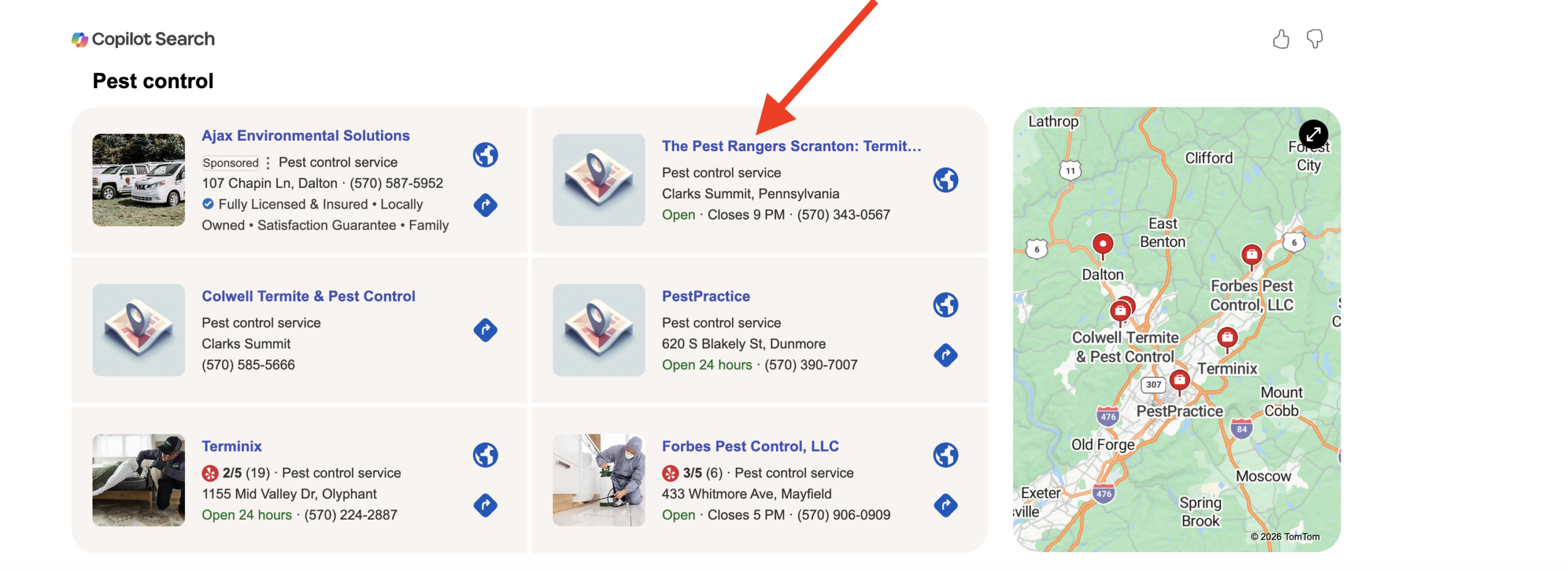 Similar to Google Business Profile, Bing Places offers another source of visibility for local searches, particularly “services near me” queries.
Your Bing Places profile provides important NAP (name, address, phone number) information, allowing users to contact you quickly and schedule service appointments.
While Google dominates overall search, Bing’s desktop presence remains significant (7.5% of total search traffic), especially among homeowners and office-based users.
More importantly, Bing users convert. Research consistently shows that:
- The average Bing user has a higher household income than the average Google searcher
- Bing users skew older, which aligns with property ownership demographics
- A 2023 WordStream analysis found Bing Ads conversion rates averaged 2.94% compared to Google Ads’ 2.70%.
Who Uses Bing Places?
Bing’s audience differs from Google’s in ways that benefit local service providers.
Bing users are statistically:
- More likely to be over age 35
- More likely to own a home
- More likely to have above-average household income
- More likely to search from desktop devices
This demographic overlap aligns directly with homeowners hiring service-based contractors, such as exterminators, landscapers, and HVAC providers.
Additionally, Bing holds a strong presence in corporate and government environments where Microsoft products dominate. Many office computers default to Bing search through Microsoft Edge.
When someone researches local providers from a workplace desktop, Bing Places influences the results they see.
What Platforms Use Bing Data?
Optimizing Bing Places improves visibility beyond Bing.com itself.
Bing local data powers all Microsoft products, including:
- Microsoft Edge browser search
- Windows 10 and 11 desktop search
- Microsoft Start and MSN
- Cortana voice search
- Microsoft Maps
- ChatGPT local recommendations
How to Optimize Bing Places for Local Search Visibility
Optimizing Bing Places follows the same principles as Google Business Profile, but with platform-specific ranking factors that Bing prioritizes more heavily than Google.
1. Claim and Verify Your Listing
Most businesses already have a Bing Places listing created automatically from public directory data. The listing exists, but it is unverified and incomplete.
Claiming your listing gives you control over business information, category selection, and the ability to respond to reviews.
Go to Bing Places for Business, search for your business name, and claim the listing. Bing allows you to import information from Google Business Profile to make the process smoother.
 Other verification methods can be completed via phone, postcard, or email, depending on how Bing originally sourced your data.
Complete verification within five business days to avoid delays.
2. Complete Every Field in Your Listing
Bing rewards profile completeness more than Google does.
Fill out every available field to make your listing as robust as possible:
- business name
- address
- phone number
- website URL
- business hours
- service area
- business description
- categories
Unlike Google, which prioritizes semantic understanding and natural language, Bing still weights exact keyword matches heavily in titles, descriptions, and meta descriptions.
Don’t be spammy, but use keyword phrases that make sense for your brand. For example, if you are a plumber in Scranton, use “plumber in Scranton” and “Scranton plumbing services” in your description naturally but explicitly.
3. Select the Right Categories
Bing allows one primary category and up to nine additional categories.
Choose categories that match how customers search, not how you describe your business internally.
A pest control company should select “Pest Control Service” as primary, then add “Termite Control,” “Rodent Control Service,” and “Wildlife Control Service” as secondary categories.
Avoid generic categories like “contractor”, which is too broad.
“Foundation Repair Contractor” or “Basement Waterproofing Service” targets specific search intent and reduces competition.
4. Upload High-Quality Photos
Bing indexes images aggressively and surfaces them in search results more frequently than Google.
Upload at least ten high-resolution photos: exterior shots of your location, team photos, service vehicles, before-and-after project images, and equipment.
Geotagged photos signal local relevance and improve rankings in map pack results.
Avoid stock photos. Bing’s algorithm detects stock imagery and discounts its value.
5. Build Citations on Bing-Friendly Directories
Bing Places pulls data from third-party directories to verify business information. The more consistent your Name, Address, and Phone Number (NAP) appear across directories, the more Bing trusts your listing.
Prioritize directories that Bing indexes heavily: Yellow Pages, Yelp, Foursquare, Merchant Circle, and local chambers of commerce.
NAP consistency is critical. If your Google Business Profile lists “123 Main St” but Bing Places lists “123 Main Street,” Bing interprets this as conflicting data and lowers your ranking. Use identical formatting across all platforms.
6. Leverage Social Signals
Bing explicitly incorporates social media engagement into its ranking algorithm. Google claims social signals do not directly impact rankings, while Bing openly states they do.
Active Facebook, LinkedIn, and Twitter profiles with consistent business information and regular posts improve Bing Places visibility.
For local service businesses, Facebook matters most. Post service updates, project photos, customer testimonials, and seasonal promotions to improve your rankings on Bing.
7. Encourage Reviews on Bing-Friendly Platforms
Bing aggregates reviews from multiple platforms, including Yelp, Yellow Pages, and Facebook, in addition to native Bing reviews. Businesses with higher review counts and better average ratings rank higher in local pack results.
Broaden review-generation efforts across platforms Bings source from–not just Google.
Respond to every review, positive or negative. Bing tracks response rates and response times. Businesses that actively engage with reviews signal better customer service and rank higher as a result.
How Bing Places Fits Into Your Local Lead Generation Strategy
Optimizing Bing Places works best when integrated with location-specific content that targets the neighborhoods, ZIP codes, and municipalities where a business operates. Local service businesses compete more effectively by targeting specific geographic areas rather than broad regions. Make all metadata and tags as geospecific as possible. Bing Places supports this approach through:- Service area definitions that specify which ZIP codes and municipalities a business covers
- Location-specific content on websites that Bing indexes and associates with listings
- Neighborhood-level visibility in map pack results for hyperlocal queries
- Integration with Bing Maps, which Windows users access by default when searching for directions